❮ All Topics | English | Deutsch | Chinese
Max Licensed Upgrade
About the Process
The process to upgrade to MAX at home requires a few steps:
- Determine Eligibility
- Purchasing Hardware and License
- Replacing Hardware
- Activating the License
Determine Eligability
All Inertia Wheels can be upgraded to MAX, although the path to do so is different based on your serial number.
Check Your Serial Number
[$] If your serial number is greater than 11041, then your wheels use a PCB which is compatible with MAX Motors and are eligible for an at-home upgrade.
[!] If your serial number is less than 11041, then your wheels will first need a PCB upgrade. This upgrade is only done at NODO HQ in Los Angeles. Please reach out to support@nodo.film for a quote and scheduling of this upgrade.
Purchasing Hardware and License
At home upgrades can be purchased online.
After completing your purchase you will receive a shipment with your MAX Motors ready to be installed on your existing Inertia Wheels.
You will also receive a license key to enable your to active your MAX Motors and change between MAX Motors and Brushless Motors whenever you would like.
Replacing Hardware
Remove Brushless Hand Wheels
Flip unit over.
Use a 3mm hex wrench to unscrew 4 x motor cap bolts behind the hand wheel.
Carefully pull wheels out and remove cables - see notes below.
[!] Use finesse when removing the two cables. Because each cable consists of multiple wires, we recommend pinching the wires (one cable at a time) and pulling directly outward so as not to rip any of the individual wires.
[!] Inside the unit, the cables are connected to the main PCB. We want to avoid disconnecting them on the inside, so when removing the cables from the Brushless Motor, keep the motor close to the main unit.
Install New MAX Hand Wheels
Connect motor and encoder cables to new MAX wheel. Use finesse and make sure each connector goes in all the way.
Slide wheel into housing.
[$] If the wheel is difficult to fit, use a 2mm hex wrench to slightly loosen the two closest bolts on the top of the unit. Be sure to re-tighten after installation.
[!] When inserting the motor in to the main housing, be sure that no cables are pinched. Tuck any slack in the cables inside the unit gently
Repeat for other side.
Place unit face down in new foam lid
Use a 3mm hex wrench to screw in 4 x motor cap bolts.
Activate the License
A license key is required to enable your Inertia Wheels to select MAX or Brushless Motors. Once the key is activated, then you wheels will allow you to manually select which motor is installed.
[!] Confirm your Inertia Wheels are running Firmware 2.3.2 or greater. Download new firmware here.
Active MAX License and Motors
Go to Menu > System > MAX Self Upgrade License.

Enter the license key into each field and select Activate License.
For example 21-31-10-161 would be entered as so:
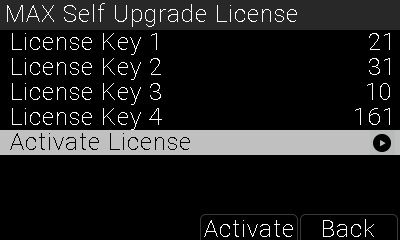
If entered correctly, the Inertia Wheels will reboot.
Once rebooted, go to Menu > System > Motor Selection.
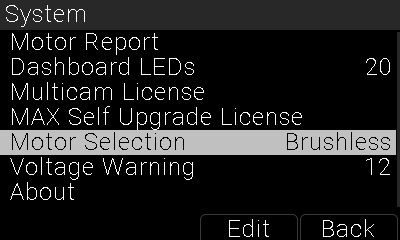
Select MAX from Motor Selection.
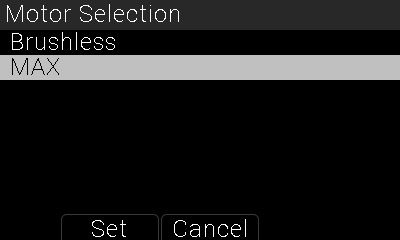
The Inertia Wheels will reboot again.
They are ready for use with MAX Motors.